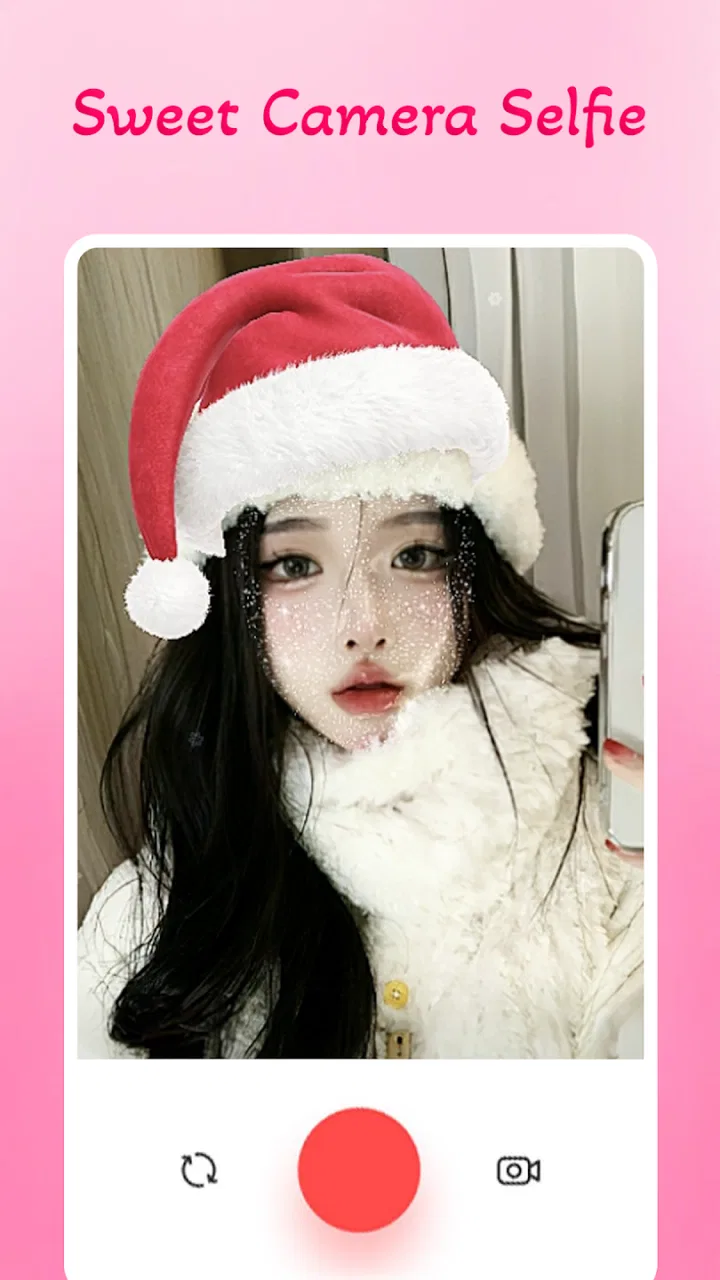
Sweet Camera Selfie
- 4.6
- Rating
- 1.00M
- Installs
- Free
- Price

 Analysis by App-foxy
I tried Sweet Camera Selfie as a lightweight beauty app rather than treating it like a full photo editor, and that distinction matters. Its main appeal is the quick, playful change from an ordinary selfie to a cute girl-style look through trending filters. The experience is aimed at people who want a fun result without spending time learning complicated editing tools.
Galaxy studio apps has positioned it in the beauty category, where the competition includes polished camera suites, social-media editors, and phone makers’ built-in portrait modes. My first impression is that this app is more focused than those alternatives. It is not trying to replace every camera tool on a phone. Instead, it gives you a simple way to experiment with a particular visual style, especially when the goal is to create a casual profile picture, a message for a friend, or a quick social post.
The app is free to install and suitable for Everyone, which makes it easy to try. Its current version is 3.1.0, and it runs on Android starting with version 5.0. That broad compatibility is useful if you are using an older phone, although the final experience will still depend on the phone’s camera, memory, and general condition. The listing shows a 4.6 average from around 18 thousand ratings and more than a million installs, so it has clearly attracted a sizeable audience.
You May Also Like

 Blood Strike: 2.5 Anniversary
Blood Strike’s Loadouts Turn Every Drop Into a Tactical Gamble
A close look at Blood Strike’s custom loadouts: how fast access to signature weapons reshapes its battle royale rhythm, rewards preparation, and narrows the gap between fights.

 Pandora - Music & Podcasts
Pandora’s Music Is Easy to Start, but Harder to Recover
Pandora’s strength is its low-effort path from a seed to a station. Its weak spot is how much confidence it asks you to place in connection, setup, and quiet recovery.

 8 Ball Pool
 Is Built on Rivalries, Rematches, and Routine
A close look at the rivalries, rematches, shared routines, and unanswered safety questions that turn a quick pool match into a persistent mobile community.

 Samsung Music
’s Quiet Strength Is Playing What You Already Own
Its reach comes less from spectacle than from dependable access to a personal library. That simplicity is both the app’s strongest retention engine and its ceiling.

 AccuWeather: Weather Radar
AccuWeather Review: A Quick, Clear Forecast for Everyday Decisions
For everyday plans, the best forecast is the one you can understand quickly. AccuWeather makes rain timing, radar, and local conditions easy to act on, with a few trade-offs.

 Hill Climb Racing
Why Hill Climb Racing Still Turns Crashes Into One More Run
A tiny car, a bumpy hill and one more upgrade: Hill Climb Racing keeps resurfacing because its simple chaos makes every near-miss feel personal.
More From Our News Desk
View All News


How Sweet Camera Selfie feels during everyday use
I find the app’s trust question is best approached through choices I can see while using it, rather than assumptions about what happens behind the scenes. In this section, I’m looking at how its focused selfie experience shapes those choices and where I’d slow down before moving from a private test to a shared photo.
Quick expectations: a playful camera, not a complete studio
The strongest reason to open this app is immediacy. You choose a look, point the camera, and see whether the effect suits the image. That makes it a natural fit for a spontaneous selfie rather than a carefully planned photo session. I would use it before sending a picture to a friend, changing a profile image, or testing a different appearance without committing to a permanent edit.
Compared with a conventional editor, the workflow feels less demanding because the creative decision happens mainly at the filter stage. You do not need to begin with a blank image and adjust numerous sliders. This can make the app feel fast in practice, especially for someone who finds professional editing interfaces overwhelming. The trade-off is control: users who want precise skin retouching, selective adjustments, layers, or detailed color correction will probably outgrow it quickly.
The “trending” approach also changes how I think about the app. It encourages browsing and trying several looks instead of building one technically perfect portrait. That is enjoyable when you are in an experimental mood, but it may be less satisfying if you already know exactly how you want the final image to look. A traditional editor is usually better for consistency across a set of photos.
One useful habit is to compare the filtered preview with the unedited view before saving anything. A strong effect can look attractive on the small camera screen but become less natural when viewed later. I found that the best results come from treating the filter as a starting point and choosing the least distracting option that still gives the image the mood I want.
What happens when you use it repeatedly
Short sessions are where this app makes the most sense. I can imagine opening it for a few minutes, trying several appearances, and keeping one image. That kind of use should place less demand on the phone than a long editing session involving multiple high-resolution files. It also matches the app’s casual personality better than using it as an all-day photo workspace.
Heavy use is a different matter. Repeatedly previewing effects, switching between camera views, and processing several images can make any camera app feel more demanding than a static gallery tool. I would avoid judging performance from the first filter alone. A better test is to try a sequence of looks, move between preview and saved images, and notice whether the phone remains responsive.
On a newer device, the basic interaction should feel more comfortable because recent phones generally have stronger processors and more memory. On an older Android phone, the camera may take longer to open or the preview may feel less fluid when an effect is active. That does not necessarily make the app unusable; it simply means the most enjoyable workflow is likely to be one photo at a time rather than a large batch.
A practical tip is to close other camera-heavy apps before starting a longer session. This is not a special requirement of Sweet Camera Selfie so much as sensible phone housekeeping. If the device is already busy with video, games, or several background apps, a beauty camera has less room to work smoothly. Keeping the session focused also makes it easier to compare results without losing track of which look you preferred.
Stability and recovering from interruptions
Camera apps have a particular weakness: they depend on the phone’s camera being available. If another app is using it, or if the operating system pauses the camera while you answer a call or switch applications, returning to the photo screen may not feel as immediate as opening a normal image editor. I would treat the app as something to reopen cleanly after an interruption rather than assuming every camera state will remain exactly as it was.
This matters in an everyday situation. Imagine taking a selfie before leaving home, then receiving a call while comparing filters. After the call, the sensible approach is to check the preview again before capturing the final image. If the camera view has reset, reselecting the desired look is less frustrating than assuming the saved image reflects the earlier preview.
For reliability, I prefer a simple routine: open the app, allow the camera view to settle, test the chosen effect, and save the result before moving to another task. That workflow reduces the chance of losing a photo because of an unexpected interruption. It also avoids keeping the camera active unnecessarily, which is useful on phones with limited battery capacity.
I would not use a casual beauty camera as the only tool for an important, once-only photograph. For a planned event, I would take a normal camera shot as well and apply a filter afterward if needed. This gives me a backup and lets me choose between the original and the stylized version. Sweet Camera Selfie is better for experimentation and quick sharing than for a situation where there is no opportunity to retake the picture.
Older phones and practical device limits
The Android requirement beginning at version 5.0 is welcoming for people who keep an older phone, but compatibility and comfort are not the same thing. A phone may install the app successfully and still show slower camera transitions, less fluid previews, or longer processing when several effects are tried. The age of the operating system is therefore only one part of the experience.
Screen size can influence the app too. On a compact display, filter choices and facial positioning may feel cramped, while a larger screen gives you a better idea of how the effect changes the whole composition. I would hold the phone far enough away to include the face and surrounding lighting rather than judging the result from an extremely close crop. The filter can only improve the image that the camera receives; it cannot compensate for poor framing or very dim light.
Storage is another everyday consideration. Keeping many test images can quickly make the gallery untidy, especially when you save several versions of the same selfie. My preferred workflow is to capture two or three candidates, review them immediately, and delete the near-duplicates. This keeps the app’s quick, casual purpose intact and prevents a session from turning into a pile of almost identical files.
Battery behavior is worth considering during longer experimentation. A camera preview is more demanding than browsing a text page, and effects can add to the workload. I would not begin a long filter session when the phone is nearly empty, particularly on an older battery. For a single selfie, this is unlikely to be a major concern; for repeated testing, it becomes part of the trade-off between convenience and phone endurance.
Where it fits against familiar alternatives
The usual built-in camera is the safer choice when you want the most dependable capture, the original image, or the cleanest control over exposure and focus. It is also the better starting point for photographs that may need editing later. Sweet Camera Selfie wins when the visual effect is the point of the picture and you want to see that style while composing the shot.
Full-featured social editors offer a wider range of adjustments and often handle collages, text, and detailed retouching more effectively. They are preferable if you are preparing a polished post with several elements. The advantage here is narrower but clear: the app keeps the experience centered on trying cute, changing appearances without making you navigate a large toolbox.
There is also a difference between live camera effects and editing an existing portrait. A live preview helps you adjust your expression and framing to the selected look. An editor gives you more freedom to revisit an old image. If you mainly want to transform photos already stored on your phone, a dedicated editor may be the more flexible option. If you enjoy seeing the effect before pressing the shutter, this app has the more direct workflow.
I would also avoid expecting professional retouching from a filter-led beauty app. Stylized changes can be flattering for a casual image, but they may look artificial when the lighting, angle, or background does not match the chosen effect. The most convincing results usually come from moderate use, natural light, and a simple background. That is a creative limitation rather than a flaw unique to this app, but it should shape your expectations.
Costs, privacy-minded habits, and choosing the right audience
The app is free, which lowers the barrier to trying it. It also includes in-app purchases ranging from $0.99 to $99.99 per item. Because of that wide range, I would pay attention to each purchase screen and avoid tapping through quickly just to unlock another look. The free starting point is useful, but anyone who wants to explore optional paid content should decide in advance how much the experience is worth to them.
For a younger user, the Everyone rating makes the app broadly approachable, but ordinary good judgment still applies to selfies and sharing. I would review an image before posting it, especially when a strong filter changes facial details or makes the result look unlike the person. A private test with friends is a better first step than immediately using an edited portrait as a public identity image.
The app is a good match for someone who wants a cheerful, low-effort beauty camera, enjoys trying different appearances, and does not need professional editing controls. It is less suitable for photographers who prioritize natural color, manual camera settings, consistent batch processing, or detailed corrections. It may also disappoint users who want one permanent, realistic retouching style rather than a collection of playful options.
One of my favorite practical uses would be a small group chat. Instead of sending the same ordinary selfie, I could try a few looks, choose the one that fits the joke or conversation, and share it immediately. Another use is testing a possible profile image: save a lightly styled version, compare it with the original later, and choose the one that still feels recognizable. These uses take advantage of the app’s speed without asking it to do work better handled by a full editor.
My performance verdict after weighing the trade-offs
Sweet Camera Selfie succeeds because it keeps its purpose understandable. It is a beauty app for quick, playful transformations, not a replacement for the phone camera or a professional editing suite. The experience should be most comfortable in short sessions, while older or busy devices may need more patience when several effects are previewed in succession.
The app’s broad Android support and free entry point make it easy to test, and its audience size suggests that the concept has found a receptive group. Still, the purchase range means I would explore the free experience first and treat optional spending carefully. I would also keep original photos when the image matters, because a stylized result should be a choice rather than the only copy.
My recommendation is simple: try it if you want fast, cute selfie experimentation, but choose a standard camera or a fuller editor when reliability, natural results, or precise control matters more than fun. Galaxy studio apps has made a focused tool, and that focus is both its main strength and its main boundary. Used for quick social moments and casual portraits, it is easy to understand and enjoyable to revisit; used as an all-purpose photo solution, it will feel limited.
FAQs for Sweet Camera Selfie
01What features does Sweet Camera Selfie offer?
Sweet Camera Selfie offers a range of features including real-time beauty effects, a variety of filters, and augmented reality stickers. Users can also enjoy editing tools such as blemish removal, teeth whitening, and reshaping tools to enhance their selfies. Additionally, the app supports video recording with live filters.
02Is Sweet Camera Selfie free to use?
Yes, Sweet Camera Selfie is free to download and use. However, it offers in-app purchases for additional features and premium content. These purchases include exclusive filters, stickers, and advanced editing tools. Users can choose whether to enjoy the free version or enhance their experience with paid options.
03Does Sweet Camera Selfie require an internet connection?
Sweet Camera Selfie does not require a constant internet connection for basic photo and video capturing. However, to access certain features like downloading new filters or stickers, and sharing directly to social media platforms, an internet connection is necessary. Offline usage is supported for core functionalities.
04How does Sweet Camera Selfie ensure user privacy?
Sweet Camera Selfie is committed to user privacy and requires permissions only necessary for its functionality, such as camera and storage access. The app does not store or share personal photos without user consent. It’s recommended to review the app’s privacy policy for detailed information on data handling.
05What devices are compatible with Sweet Camera Selfie?
Sweet Camera Selfie is compatible with most Android and iOS devices. The app requires Android version 5.0 and up or iOS version 10.0 and later. It is optimized for smartphones and tablets. Users should ensure their device meets these requirements to enjoy a seamless experience with the app.
Pros
- High-quality filters enhance photos beautifully.
- User-friendly interface for easy navigation.
- Wide range of editing tools available.
- Real-time beauty effects for selfies.
- Quick sharing options to social media platforms.
Cons
- Contains ads that can be intrusive.
- Some features require in-app purchases.
- Occasional crashes on older devices.
- Limited free sticker options.
- May consume significant battery life.

Sweet Camera Selfie
Gallery